


Discover the best order block indicator for automated trading. The indicators identify areas where institutional buying or selling occurred. The strategy shows zones of liquidity that can cause future price movements. As an active trader, leverage these areas to spot potential reversal or continuation points. You need to perform manual chart analysis to find these blocks. Use the LuxAlgo indicator to find high-probability zones automatically. Read on to learn about an advanced to automate.
Volumetric Order Blocks
Use the volumetric indicator for automated trading. The tool highlights price areas on the chart where the market accumulates orders. You can use these areas as potential support or resistance levels. The marked area disappears once the order is mitigated. Check our type of volumetric script and their use:
- Bullish Volumetric script: The block shows areas that are near the swing low. This acts as a potential support level.
- Bearish Volumetric: The block shows areas that are locations near the swing high and act as potential resistance.
You can even increase the indicator length setting to see longer-term volumetric OB. Surely, use a volumetric order indicator to spot LuxAlgo trade reversals.
ICT Order Block
Integrate the ICT indicator for automated trading. The tool allows you to identify institutional trading patterns on the chart. These patterns signal future market direction. You can leverage this potential market direction to execute trades on these institutional areas. Review the different trading methods the toolkit offers for automated trading:
- Aggressive entries: Execute trade above/below key candles.
- Conservative entries: Wait for price confirmation to execute trade.
- Probability entries: Identify the sweeps and market shifts.
The strategy will provide clarity on market movements automatically. Surely, use the best indicators for order block trading strategy.
Automated OB Detection
Perform an automated block detection for trading. The Volume Profile and PAC tool allows you to analyse market data to find OB. The analysis will be more accurate compared to traditional manual methods. You can even integrate the tool into the TradingView platform to get precise insights. Moreover, the tool will enable you to evaluate performance across different assets and timeframes. Understand the options the decision tool offers for automated trading:
Institutional Context Filters
- Multi‑Timeframe Detection
- Zone Filtering
- Custom Alerts
You can even use the AI backtesting assistant to optimise your algo strategy. Surely, automate block detection with ICT order block trading script.
Trading Order Block Price Action
Configure the order block price action indicator for automated trading. The tool focuses on price action patterns to find order and breaker blocks. You can see the conditions without setting up any input lengths. The price action identifies and converts the block into breaker areas based on market. You can leverage the data to spot new trading opportunities. Check out the customisation settings the indicator offers:
- Detection: Choose the market structure for swing point detection.
- Last bullish OB: Show recent bullish order and breaker.
- Last bearish OB: Show recent bearish orders and breaker.
- Use candle wick: Define block areas using body.
Leverage PAC to streamline analysis across market trends, patterns, S/R zones, structure, imbalance, and liquidity. Then, employ volumetric OBs to pinpoint where serious market institutional players are accumulating orders. AI-powered algorithms automatically highlight these areas and remove signals once areas are mitigated.
When you’re trading with Price Action Concepts, there are several key zones to keep in mind:
- Breaker
- Internal metrics and activity
- VOB metrics
- Mitigation methods
- MTF OBs
Surely, use the Luxalgo block indicator to get a high
Breaker or Order Blocks
Know the difference between Breaker to inform your strategy. Use Order Blocks to identify institutional activity and entry points. Implement Breaker after to re-test after a mitigated block. Highlight Market Structure Shifts (MSS) to detect breaker. Combine both strategies to identify trade setups and watch out for trade reversals.
Order Block Detector Settings
Customizing the Detector settings to fit your style will enhance your strategy and increase your win rate. Choose from the following setting options to determine critical points for your quick decisions:
- Pick between the “wick” and “close” mitigation methods and rely on accurate conditions to analyze if an block has been mitigated
- Set alerts to be notified about the creation and mitigation
- Change the Bullish OB and Bearish OB setting to command how many recent unmitigated block are visible on the chart
- Change the look of the average OB level to according to your visual needs
- Reduce the Volume Pivot Length to detect more frequently
Master the settings for invaluable adaptation for your volume-driven strategy.
ICT Indicator
Simplify your Block analysis with ICT Indicator. Highlight zones of interaction between prices and previous blocks using Inner Circle Trader (ICT) price structures. Elevate your strategy by identifying potential market turning points using propulsion. Leverage the combination of script and propulsion areas to find major accumulation zones and capture key market behavior patterns. Surely, use the free ICT indicator to highlight market behavior insights.
ICT Propulsion Block
Use the ICT propulsion block indicator for automated trading. The powerful tool allows you to gain insights into blocks within price structures. You can find the market turning points after analysing the zones between prices and order blocks. These areas are mapped on the chart where price action interacts with previous OB. Check out the customisation setting ICT Propulsion Block Indicator offers:
- Swing detection length: Define the lookback period to find swing points.
- Mitigation price: Choose whether to analyse mitigation based on price or wicks.
- Highlight propulsion signals: Easily spot block signals on the chart.
- Remove unassociated: Remove clutter by hiding irrelevant block.
- Remove mitigated order block: Focus on removing outdated mitigated areas
The tool is available on the LuxAlgo Library and other charting platforms such as TradingView, MT4/MT5, and NinjaTrader. Surely use the ICT block tool in your
Block Detector LuxAlgo
Use the order block detector indicator for automated trading. The tool allows you to identify areas where institutional traders are concentrating orders on lower timeframes. Leveraging the volume peaks data, you can pinpoint order on the chart. You can choose from the wick and close methods to find mitigated OB automatically. The chosen method allows you to refine your algo strategy. Check out the block detector Luxalgo settings for auto trading:
- Volume pivot length: Sets lookback to detecting volume peaks.
- Bullish OB: Shows the latest unmitigated bullish.
- Bearish OB: Shows the latest unmitigated bearish.
- Line style: Adjust the average line look based on your preferences.
- Mitigation: Choose between the wick or the close method.
You can access the tool in the LuxAlgo platform, TradingView, MT4/MT5, and NinjaTrader. The custom alerts can be set up for better decision-making. Surely, connect and use LuxAlgo backtesting with your average order block level.
Order Block Detector Luxalgo Script
Leverage block detector LuxAlgo script for automated trading. The tool uses high-volume data to find accumulated market participants. You need to use a lower timeframe on the chart to detect volume peaks. The tool automatically hides the mitigated order from the chart. This allows you to choose from two mitigation methods, such as “wick” and “close”. You can even set up a custom alert to receive notifications for bullish/bearish block. Definitely, choose the block detector tool for algo trading.
Smart Money Concepts (SMC)
Use Smart Money Concepts (SMC) toolkit for automated trading. The indicator provides key insights into areas directly on your charts. These zones show where institutional trading actions might occur. You can leverage the price action strategies to automatically map trade entry and exit points. Targeting different OB zones enables you to optimise your strategy. Check out the features of the SMC indicator:
- Real-Time Structure Labelling
- BOS & CHoCH Detection
- Order Highlighting
- Fair Value Gaps
- Premium/Discount Zones
and many more
You can modify the tool settings to enhance your trading chart experience. Surely leverage the smart money algo to map order zones on the chart.
LuxAlgo Price Action Concepts (PAC) Toolkit
Use the LuxAlgo price action concepts toolkit for algorithmic trading. The indicator provides an automated order block detection option. You can see real-time bullish and bearish zones on your trading chart. The tool scans price breaks action for qualifying market structures and highlights the institutional levels. Moreover, the indicator removes mitigated zones automatically which ensures a clean layout. Review the advanced features the PAC toolkit offers:
- Multi-timeframe detection: Displays higher-timeframe order on lower charts for strong momentum.
- Dynamic zone filtering: Adjust sensitivity and choose which to show.
- Advanced alerts: Get alerts instantly when median price touches, breaks, or mitigates important zones.
You can combine the PAC detection with the AI backtesting algo trading assistant to optimise your trading strategy. Surely use price action concepts indicator for automated trading.
Order Block Entry and Exit Trading Strategy
Integrate order entry and exit strategy for automated trading. The strategy involves identifying and utilising zones where institutional high volume activity has occurred. These areas on the chart act as potential liquidity zones. You can use this data to execute trade entries and exits. Check out the precise entry and exit points to automate trading:
- Entry strategies: Enter trades near areas where liquidity is high. Wait for bullish or bearish signals to confirm entries.
- Exit strategies: Exit at key LuxAlgo support and resistance levels, price shows signs of weakness.
Surely use advanced order areas tradingview indicators to automate trade entry and exit.
Pure Price Action OB
Configure a pure price action OB tool for algo trading. The indicator utilises price action patterns to identify order and breaker blocks. You can get dynamic and objective analysis data to know market conditions. Usefully, these areas are utilised to mark S/R zones. You can leverage the price data to refine your strategy and to spot trade opportunities. Check out the customizable settings available to perform analysis:
- Detection: Set the market structure for swing points.
- Bullish OB: Shows recent bullish order/breaker.
- Bearish OB: Shows recent bearish order/breaker.
- Candle Body: Uses body to mark OB zones.
Surely use LuxAlgo pure median price to capture trade reversals with LuxAlgo Signals.
Pure Price Action ICT Tools
Leverage pure price ICT tools for algo trading. The indicator automatically finds real-time market structures, liquidity zones, and block. The average order block level and breaker blocks allow you to identify significant levels in the market. You can use the analysis to mark key S/R levels. Review the order and breaker areas settings to enhance your script:
- Order and breaker: Toggle visibility of order and breaker blocks.
- Detection: Identify by swing-level.
- Last bullish and bearish: Set the number of recent bullish or bearish blocks to show on the chart.
- Candle: Use candle bodies instead of the full range.
Smart Money Concepts (SMC) toolkit offers customisation settings to enhance your trading chart:
- Mode and style: Choose between historical/Present view and colored style.
- Structure display: See candle plots with internal and swing structures.
- Swing points: Mark HH, HL, LH, LL zones for chart clarity.
- Order: Enable the most recent Internal.
- Fair value gaps: Show market imbalances with filters.
- Zones: Mark premium and discount zones for trade opportunities.
Definitely use Luxalgo pure price ICT tools for automated trading.
Bullish & Bearish Blocks
Understand bullish and bearish order blocks for automated trading. The OB allows you to find institutional trading patterns in the market. You can use these signals to know the potential market price direction. The bullish and bearish OB act as key S/R levels. Review the key difference between the bullish and bearish:

| Bullish Blocks | Bearish Blocks |
| Form after bearish candles followed by upward movement. | Form after bullish candles followed by downward move. |
| Act as support zones for rising prices. | Act as resistance zones for falling prices. |
| Found near key levels where big buyers step in. | Found near resistance where big sellers trade. |
| Liquidity sweeps below lows. | Liquidity sweeps above highs. |
Surely, use LuxAlgo signals and overlay settings to find bullish and bearish order blocks.
Pure Price Action Order & Breaker Blocks
Use the Pure Price Action Order & Breaker Blocks indicator to focus on patterns and detection. Avoid using predefined input lengths and gain an unbiased perspective on the market. Leverage the indicator to mark S/R levels and turn the invalidated into breaker. Be sure to confirm a breaker block by checking for price revisiting and mitigating the order block. This will signal potential retracement or continuation setups within smart money price action. Employ this LuxAlgo Block Indicator for swing detection and eliminate guesswork from your trading strategy. The Short-term Swing High and the Short-term Swing Low will enable you to focus on real-time market dynamics. Surely, when using the indicator to customize the settings to suit your volume profile algo trading strategy.
Breaker Blocks vs Order Blocks
Understand the breaker blocks and OB for automated trading. Both tools allow you to enhance your strategy and make informed decisions. nlike other indicators, these toolkits can accurately forecast when OBs will become BBs. With this insight, you can capitalize on market continuations or reversals before they fully develop. Leverage full control over your displayed bearish and bullish. This way, you can customize your chart environment to reflect your goals, needs, strategy, and preferred layout. You can implement the tool in various market conditions. The OB shows the area where strong institutional buying or selling activity happens. Whereas the breaker block is created when the block fails. Review the key difference between areas:
| Order Blocks | Breaker Blocks |
| Institutional accumulation or distribution | Failed blocks after structure break |
| Continue existing trend | Indicate reversals or price shifts |
| Mark entry/exit zones | Show structural change |
| Stop loss placement outside OB zone | Stop loss placement outside BB zone |
>> For recommended styling options, utilize historical polarity changes to analyze where swing lows and highs have previously occurred within your breaker block. This approach provides a stronger understanding of overall market and price trends.
Both strategy outputs depend on your trading style and market environment. Surely, use a breaker and blocks in your algo trading strategy.
Dynamic Order Blocks
Use Dynamic Blocks Trading Indicator for dynamic analysis of potential price reversal points. The technical analysis tool displays the most recent mitigated bullish and bearish on the chart. Leverage the feature to identify zones where crucial market activity is taking place. For strategic planning, it is important to adjust the setting and identify longer-term. You can do that by changing the “Swing Lookback” setting to a higher value. Utilize this Order Block TradingView algo indicator to maximize strategy development and highlight area of major price shifts.
How To Trade Dynamic Blocks With Stop Loss Parameters
With your LuxAlgo indicator selected, you are ready to start trading dynamic OBs. Utilize your toolkit to dynamically track S/R zones based on various market scenarios. This can help you understand real-time trend direction, analyze OB mitigation, and forecast overall sentiment.
Depending on your environment, needs, goals, and preferences – you can trade dynamic OBs on a wide range of platforms, including:
- Thinkorswim
- MetaTrader 4 and 5
- NinjaTrader
>> Before live trading, fine-tune your settings for higher yields, long-term analysis, strategic depth, and comprehensive candle range.
Start trading automated dynamic OBs with LuxAlgo tools and indicators.
Fair Value Gaps
Use Fair Value Gaps to underline market inefficiencies and imbalances and be able to potential reversals or continuations. Fast market movements cause untraded price gaps and give traders an opportunity to streamline entry and exit strategies. Use Fair Value Gaps (FVGs) to identify areas of S/R. Typically, you can expect the price to reverse when the gap is filled. Improve your accuracy and reduce time by employing the LuxAlgo Price Action Concepts(PAC) to analyze market inefficiency. FVGs and PACs are greater precision tools to add to your playbook to make the most of your Block trading strategy. Additionally, you can use the LuxAlgo Fair Value Gap Indicator to helps you confirm support, resistance, and imbalance levels efficiently.
Process To Find Order Blocks (OBs) in Trading
Master your understanding of Order Blocks to trade like professionals. OBs are regions on the chart where institution buying and selling activity happens. Leverage your knowledge to highlight support and resistance and high-liquidity zones on your TradingView chart. Learn how to find both bullish and bearish by following the steps below:
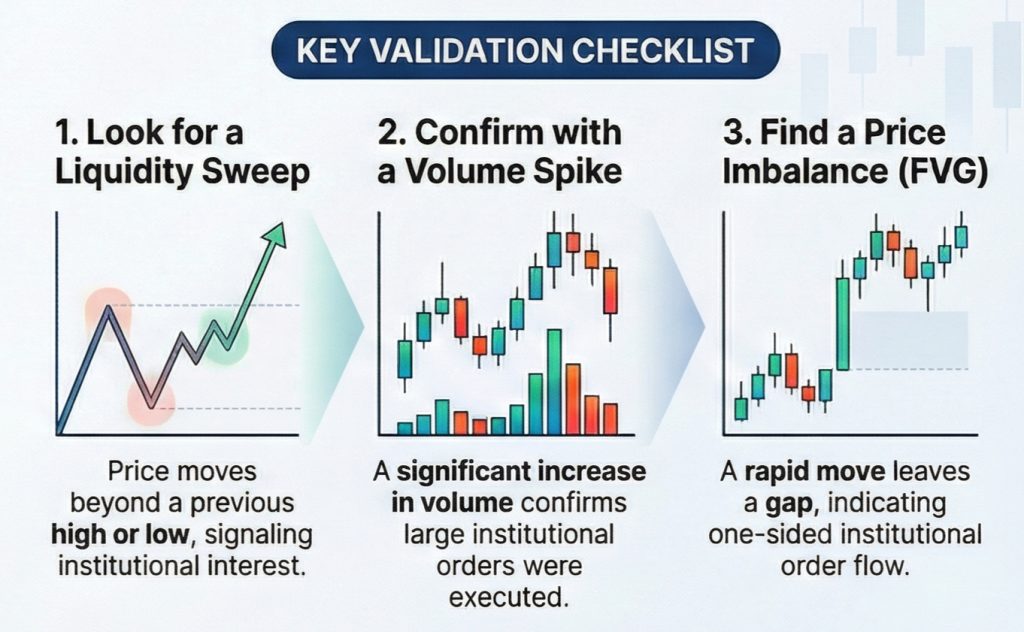
- Recognizing Consolidation and Breakouts – Track well defined support and resistance levels and low trading volumes for consolidation. Breakouts will have high trading volume and price behavior outside the consolidation zone.
- Confirming Using candlestick patterns – Confirm the block by spotting the final opposite candle before a strong directional move. Validate bullish by identifying the last bearish candle before a rally. Bearish will be confirmed by looking at the last bullish candle before a drop.
- Integrating Fair Value Gaps – Use FVGs to reconfirm and enhance your accuracy. Look for an imbalance between buying and selling near a potential order block.
- Using the Free LuxAlgo Block Indicators – Transform your trading experience by utilizing LuxAlgo indicators like ICT Propulsion Block Indicator, S&R Levels With Breaks, and Smart Money Concepts. Find both static and dynamic indicators in the LuxAlgo library with customizable settings for your trading preferences.
You can also leverage the LuxAlgo Price Action Concepts (PAC) Toolkit and the AI Backtesting assistant to automate the detection and backtesting process.
How To Hide Overlapping Order Blocks
Use the “Hide Overlap” setting for a more focused visualization. Dictate the display of overlapping OBs by choosing to hide or show the overlap. Picking to hide the overlap will only show you the most recent one. Enhance the clarity even further by changing the color of these price imbalance zones on your chart. Trade overlaps to as refined entries or use the setting available to hide the former volumetric blocks.
Order Block Detector Settings
Customizing the Detector settings to fit your style will enhance your strategy and increase your win rate. Choose from the following setting options to determine critical points for your quick decisions:
- Pick between the “wick” and “close” mitigation methods and rely on accurate conditions to analyse if an has been mitigated order blocks.
- Set alerts to be notified about the creation and mitigation
- Change the Bullish OB and Bearish OB setting to command how many recent unmitigated are visible on the chart
- Change the look of the average OB level to according to your visual needs
- Reduce the Volume Pivot Length to detect more frequently
Master the settings for invaluable adaptation for your volume-driven strategy.
Key Features of Order Block Indicator
After understanding the best LuxAlgo Indicators, leverage the following features to effectively use Order Blocks in your trading strategy:
- Instant Market Clarity: Spot instantly with clearly labeled and color-coded zones.
- Tailored Visual Experience: Personalize your TradingView chart with adjustable colors, labels, and display settings. Create a setup that enhances visibility and aligns with your trading style
- ZigZag Functionality: The integrated ZigZag algorithm pinpoints every swing high and low with accuracy.Use it to accurately detect block formations.
- Dynamic Color Schemes: Select from a range of preset color themes or design your own custom palette for different elements to enhance chart clarity.
- Comprehensive Block Types: Improve your market manual analysis by identifying unmitigated, mitigated order block, and breaker blocks.
Features designed to customize the chart to your 1-Minute Scalping Algo will surely help you to recognize, analyze and execute on your strategy performs.
PAC Detection Algorithm
Integrate the PAC OB detection tool into an automated trading strategy. The tool automatically highlights bullish and bearish zones. These zones are highlighted in real-time on the TradingView chart. You can use the tool to scan price action until the structure qualifies and plot institutional zones. Review the features the algorithm offers for automated trading:
- Multi‑timeframe detection on lower‑timeframe
- Zone filtering using sensitivity and display rules
- Institutional trade filtering.
- Custom alerts for touches, breaks and mitigations.
You can combine the tool with the AI backtesting assistant to validate and optimise your strategy. Surely, use the PAC block detection algorithm for automated trading.
ICT Immediate Rebalance Toolkit
Use the ICT immediate rebalance toolkit for automated trading. The toolkit assists traders in identifying crucial trading zones. You can integrate the indicator with price action mechanisms to capture rebalance patterns. These candlestick patterns allow you to enhance your decision-making process. Check out the features the tool offers for chart analyses:
- Order and breaker
- Buyside and sellside liquidity
- ICT immediate rebalance
- Liquidity voids
You can access the tool from the Luxalgo library and the TradingView charting platform. Surely, use the ICT immediate rebalance toolkit for automated trading.
Pure Price Action ICT Tools
Connect the pure price action ICT tools for algo trading. The indicator helps find market structures, liquidity levels and blocks. The tool operates completely based on price patterns. You can find the signal strength after analysing key candlestick patterns like a higher low in a downtrend or a lower high in an uptrend. Review the configuration settings ICT tools offer:
- Market structures visibility.
- Detect market structures based on the importance of levels.
- Market structure highlighting the key levels.
- Customises style options
Definitely, integrate the pure price action ICT toolkit into your algo trading strategy.
Automate Trades Using LuxAlgo With Risk Management
Automate your trades using the LuxAlgo trading strategy. The script maps the significant buying or selling activity on the trading chart. These movements are driven by banks, hedge funds, or large financial institutions’ activities. You can leverage these areas to pinpoint price reversal or continuation trends. The automated strategy uses real-time market conditions to evaluate performance. You can integrate LuxAlgo signals into a trading bot to auto-execute buy and sell signals. Definitely, use the LuxAlgo Automated strategy with smart money algos.
Breaker Blocks with Signals
Integrate breaker blocks with signals for automated trading. The script allows you to enhance trading strategies using breakers. You can see the highlight signals between the price and over the chart. Leverage these areas as potential take-profit and stop-loss levels. Plus, the tool offers built-in alerts to notify when a signal triggers based on set parameters. You can access the toolkit from TradingView and the MetaTrader (MT4/MT5) charting platform or demo account. Definitely, connect the breaker with signals for automated trading.


